
NEWS
Google Slips Gmail AI Inbox Beside the Chronological List
Google is adding Gmail AI Inbox to paid U.S. Workspace as a sidecar briefing, after earlier inbox experiments, with no admin switch.

Google is rolling out Gmail AI Inbox to paid U.S. Workspace accounts as a separate menu view that pulls deadlines and follow-ups out of mail. Rapid Release domains began seeing it on October 12, 2026. Scheduled Release domains start on October 26, and each track can take up to 15 days to show the view.
The chronological list stays. Google is not asking anyone to live only in the briefing, which is the part of this launch that rhymes with every earlier attempt to sort Gmail for you.
Gmail Puts a Live Briefing Next to the Old Inbox
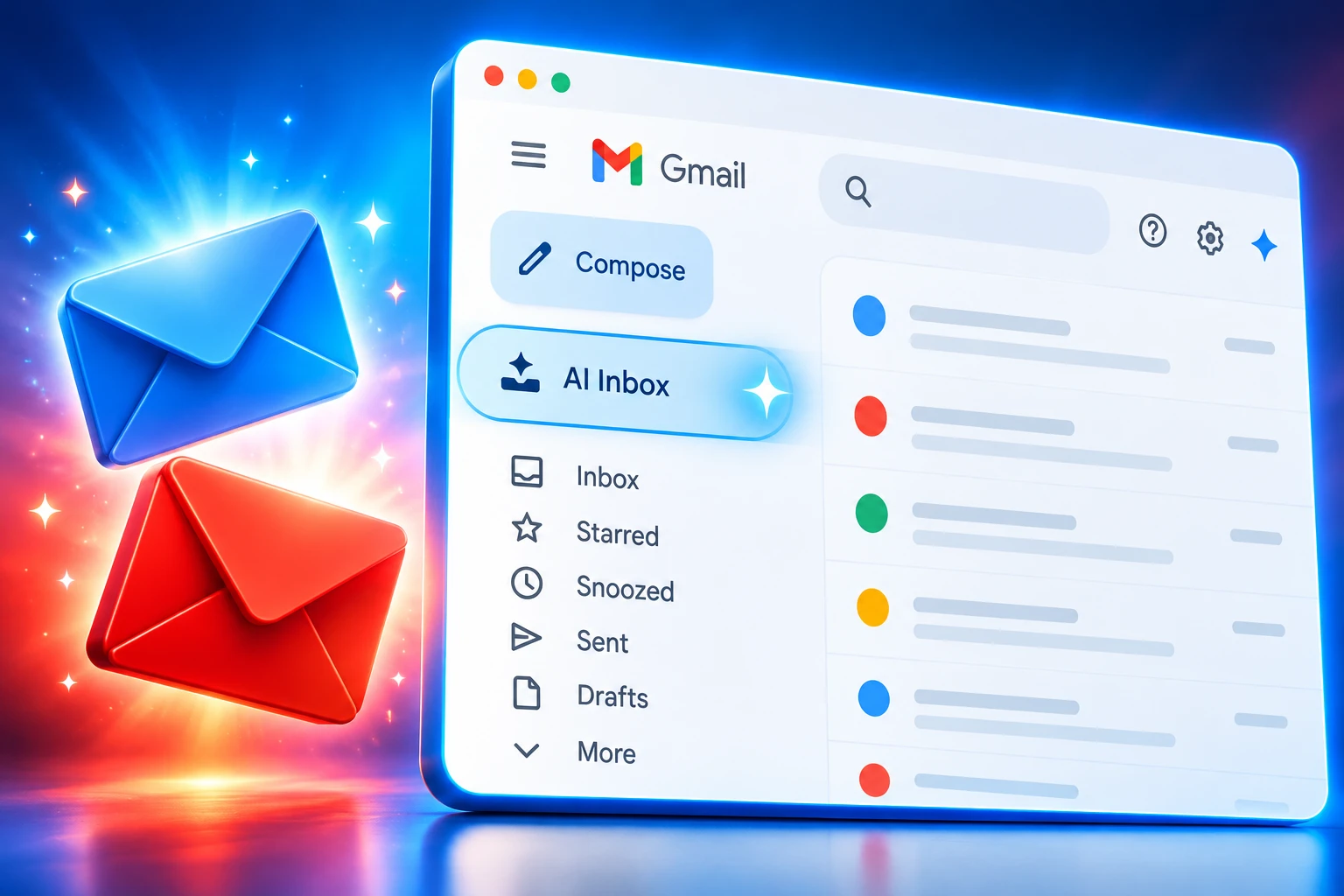
AI Inbox sits in the Gmail navigation menu on the desktop web client and in the mobile app menu. It does not replace the date-ordered inbox. Google’s Workspace Updates post on October 15, 2026, frames it as a way to stay on top of daily business workflows by lifting action items and status changes out of long threads.
Two sections do the work. Suggested to-dos extract action items, deliverables, and deadlines buried in conversations, so a follow-up does not have to be copied by hand into another app. Topics to catch up on group rapid replies and multi-message project mail into summaries of the latest decisions and status changes.
That is a step past the single-thread Gemini recap that appears after you open a message. The new view scans incoming mail and builds the briefing before you ask. Blake Barnes, VP Product for Gmail, introduced the idea on January 8, 2026, when Google still limited it to trusted testers.
AI Inbox is like having a personalized briefing, highlighting to-dos and catching you up on what matters.
Blake Barnes, VP Product, Gmail, Keyword blog, January 8, 2026
Barnes said the view picks VIPs from people you email often, people in Contacts, and relationships inferred from message content, and that the analysis stays under Google’s privacy controls. The January pitch used dentist reminders, bills, and soccer season. The October Workspace post talks about deliverables and business leaders. Same two sections, two audiences.
Google’s help pages walk through how to manage to-dos and topics with AI Inbox once the view appears. You can open the related mail, tap View or Reply, mark an item done, remove a bad to-do, and rate the quality. On Android, the entry is in the app menu, and a pull from the top refreshes the briefing.
Google posted a short demo when the tester program opened.
Who Gets AI Inbox in October, and Who Waits
The October wave is narrower than the plan list at the top of Google’s post. The feature is available only to users in the United States whose account language is set to US English. Google lists Business Starter, Business Standard, Business Plus, Enterprise Starter, Enterprise Standard, Enterprise Plus, Frontline Plus, and AI Pro for Education as editions in scope, then says Starter and Education editions get the view later in the coming months.
This wave is the paid mid and upper tiers. Business Starter already includes Gemini in Gmail on Google’s public pricing page, at $7 per user per month on an annual commitment, but it waits on AI Inbox. Business Standard at $14 per user per month, and Business Plus at $22, are in the October window with Enterprise Standard, Enterprise Plus, and Frontline Plus. Enterprise prices are not listed as a public monthly rate on that page.
WORKSPACE PLANS AND THIS WAVE
| Plan | Annual price (per user / month) | AI Inbox timing |
|---|---|---|
| Business Starter | $7 | Coming months |
| Business Standard | $14 | October wave |
| Business Plus | $22 | October wave |
| Enterprise Standard and Plus | Contact sales | October wave |
| Frontline Plus | Not listed | October wave |
| Enterprise Starter and AI Pro for Education | Not listed on the public page | Coming months |
Accounts on the same plan will not all see the menu on the same morning, because Google is stretching each track across up to 15 days. The Rapid Release and Scheduled Release tracks are a domain setting, not a user preference. If a company is on Scheduled Release, October 26 is the floor, not a personal toggle.
The same week’s Workspace Updates blog also started Gmail Live, a mobile voice search over the inbox, for paid customers. That is a second Gemini surface in Gmail, not a substitute for the briefing view.
Sixteen Years of Trying to Retire the Chronological List
Gmail launched on April Fool’s Day in 2004. Sundar Pichai, CEO of Google and Alphabet, used that anniversary on January 8, 2026, when he posted that the company was bringing Gmail into the Gemini era, with AI Overviews, suggested replies, Proofread, and AI Inbox among the new views.
The urge to sort that pile is much older than Gemini. On August 30, 2010, software engineer Doug Aberdeen introduced Priority Inbox as a beta that split the inbox into Important and unread, Starred, and Everything else. Gmail would guess importance from who you mailed and which threads you opened, and you could correct it with plus and minus buttons. It was opt-in. You could go back to the normal view from Settings.
That winter, engineering manager Pal Takacsi-Nagy said typical Priority Inbox users, measured by median time in conversation view, spent 43% more time reading important mail than unimportant mail, and 15% less time reading email overall than people who left the feature off. The product still trained a generation to glance at the yellow importance marker and then keep scrolling the rest.
Inbox by Gmail was the fuller break. Google launched it in 2014 as a place to try snooze, Smart Reply, Nudges, bundles, and high-priority notifications. On September 12, 2018, Google said it would end support at the end of March 2019 so it could focus solely on Gmail, after moving popular Inbox ideas into the main app. Admins could disable Inbox before the cutoff. Users who liked bundles and trip stacks had to come home to the list they had left.
HOW GMAIL HAS SORTED MAIL BEFORE
- April 1, 2004: Gmail launches, later reaching 3 billion users by Google’s January 2026 count.
- August 30, 2010: Priority Inbox splits the inbox into important, starred, and everything else, as an opt-in view.
- 2014: Inbox by Gmail opens as a separate client for snooze, Smart Reply, Nudges, and bundles.
- End of March 2019: Google ends support for Inbox by Gmail and tells workplaces to use Gmail.
- January 8, 2026: Barnes opens AI Inbox to trusted testers as a briefing of to-dos and topics.
- October 12, 2026: Rapid Release Workspace domains begin receiving the paid U.S. English wave, up to 15 days.
- October 26, 2026: Scheduled Release domains begin their own 15-day window.
Priority Inbox still lives as a sorting habit. Inbox by Gmail does not. AI Inbox is the first new briefing view Google has been willing to put back in the Gmail menu since that shutdown.
The Sidecar Is the Lesson From Inbox by Gmail
Inbox by Gmail asked people to change apps. Priority Inbox asked them to change the shape of the list they already had. AI Inbox asks for a click in the menu, then leaves the old stack in place if the briefing is wrong, late, or simply not how someone works.
That is the design that survived. Google spent 16 years, from Priority Inbox in 2010 to this Workspace wave, learning that a billion-plus mail users will forgive a new pane and will not forgive a missing list. The January tester notes and the October admin notes both describe a view you open. They do not describe a new default inbox.
The paid wall is new relative to those older experiments. Priority Inbox shipped to Gmail and Google Apps. Inbox by Gmail was a consumer client. AI Inbox’s first broad work rollout is a Workspace SKU split, in one country, in one language. Starter customers who already pay for Gemini in Gmail still wait. Free consumer Gmail is not in the October post at all.
Google has also stopped pretending a second inbox is a side project with its own brand. There is no new app icon to abandon in 2019. The briefing is a line in the Gmail menu, which is how a company keeps the experiment without splitting the user base again.
No Admin Switch for a View Some Users Cannot Hide
Workspace administrators do not flip this on. Google’s October 15 post is blunt: there is no admin control for this feature. Eligible users see it in the Gmail menu when their domain’s rollout reaches them. That is the opposite of Inbox by Gmail, which admins could disable from the console before the shutdown date.
The missing switch will sit badly with IT teams that gate Gemini, smart features, or anything that reads mail without a ticket. It will please teams that were tired of waiting on an admin to check a box. Both can be true in one company, which is why a sidecar with no off switch is still a policy event.
Users are not as locked as admins. Gmail Help Community guidance for the desktop web client points to Settings, then Inbox, then a Show AI Inbox checkbox. Android testers have described a harder path, with the tab lingering after smart features were turned off until the desktop setting and an app refresh lined up. Treat that as a field report, not a Google promise.
The January announcement on X drew a simpler objection than any settings menu. People said they wanted mail in the mail app, and that a model sitting on the inbox was a reason to look at hosts that will not summarize it for them. Google’s answer, in product form, is that the old list remains a click away. The answer in policy form is still that admins cannot keep the briefing off the menu.
WHAT TO CHECK IF THE MENU IS EMPTY
- Language: The account language has to be US English, not another English variant, for this wave.
- Country: The user has to be in the United States; Google has not posted a date for other markets.
- Plan: Standard, Plus, Enterprise Standard, Enterprise Plus, and Frontline Plus are in the October window; Starter and AI Pro for Education wait.
- Release track: Rapid Release began October 12; Scheduled Release does not begin until October 26, and both can take up to 15 days.
Those four checks will clear most “where is it?” tickets. They will not tell a European or Japanese domain when its turn comes.
WHAT WE KNOW
- This wave: Paid U.S. Workspace users on the listed mid and upper plans, US English only, menu view, no admin control.
- The two sections: Suggested to-dos and Topics to catch up on, with Mark done and feedback on items.
WHAT IS UNCONFIRMED
- Other countries and languages: Google has not announced when AI Inbox leaves U.S. English.
- Starter and Education dates: The company only says coming months, with no day on the calendar.
Until those two lines move, a global Workspace tenant should assume a split inbox: some U.S. English seats get a briefing, and everyone else stays on the list.
Deadlines Buried in Threads Become Line Items
The product Google put first in the October bullets is not the summary. It is the extracted to-do. That tells you what the company thinks is breaking at work: people miss the deadline in message 14 of a 30-message chain, then paste it into Tasks, then forget to tick it off. Testers in Google’s own Gmail forum described that loop in March 2026, and said checking a generated item beat hunting the thread twice.
The cost of that convenience is that Gmail now has an opinion about what you promised. One early tester said the view mixed Gmail and Chat follow-ups well, then mislabeled an internal OKR tool update as a note from a partner board. A briefing that is almost right is how a wrong due date becomes the due date on someone else’s dashboard.
Senders will feel that next. If the model reads for deliverables and dates, a deadline buried in a polite middle paragraph is easier to drop than a date on its own line. People already write subject lines for search. They will start writing bodies for extraction, because the person who needs the task may only see the briefing. That is a change in how office mail gets written, and it does not wait for a language expansion to start in U.S. English threads.
Google’s January post called this a personalized briefing highlighting to-dos, powered with the rest of that launch by Gemini 3. The October post is the work rollout of the same briefing. Help Me Write, Suggested Replies, and AI Overviews in search already teach Gmail users to let a model draft and recap. AI Inbox is the first of those tools that tries to own the morning look at what is due.
Scheduled Release domains still have until October 26, 2026, before their 15-day clock starts. Starter and Education seats, and every language besides US English, remain on the old list until Google names a day. The chronological inbox, the one Priority Inbox and Inbox by Gmail could never quite kill, is still right there in the menu.

Cook Hands Democrats the House as Crypto’s Bill Stays Dead

Wicker’s Broken Bed Was the Short Story’s Punch Line

Nvidia’s $500 Billion Financing Plan Draws a $180 Sell

Maserati Bets the Grecale V6 Can Fill Porsche’s Gap

EV Cable Theft Follows the Old Railway Copper Playbook

Aramco Crash Kills 14 Two Days After Oil Restart

Salah Captained Egypt to Their First World Cup Win

Zelda’s 40th Switch 2 Ships Without a Zelda Game

Apple Labor Day Deals Hide June’s Memory Price Hike

Palworld 1.0.4 Adds Palpedia Search After the 1.0 Launch
-
 BUSINESS4 months ago
Aramco Crash Kills 14 Two Days After Oil Restart
-
 NEWS5 months ago
Salah Captained Egypt to Their First World Cup Win
-
 GAMING2 months ago
Zelda’s 40th Switch 2 Ships Without a Zelda Game
-
 NEWS2 months ago
Apple Labor Day Deals Hide June’s Memory Price Hike
-
 GAMING2 months ago
Palworld 1.0.4 Adds Palpedia Search After the 1.0 Launch
-

 NEWS4 months ago
El Niño Puts Israel’s Needed Winter Rain on a Flood Clock
-

 BUSINESS8 months ago
BAE’s 60-Year Saudi Franchise Now Runs Through Taif
-

 BUSINESS8 months ago
Egypt Bets EGP 638 Billion Can Open Sinai to Investors