
NEWS
Fitbit Edge Tracks Hourly Steps but Never Nudges You
Google’s Fitbit Edge still logs the 250-step hourly goal, but it never vibrates, repeating the Air’s quiet design on a tracker that has a screen.

Google’s $179.99 Fitbit Edge still logs the old 250-step hourly goal, but it never vibrates when you fall behind.
Owners on Reddit and in the Google Health Community say there is no Reminders to Move switch for the new band, which reached shelves on October 27. The tracker records the hours. It does not tap the wrist 10 minutes before the hour, the cue Fitbit used since 2016.
Does the Fitbit Edge Have Reminders to Move?
No. People using the band say the Google Health app has no Get Reminders toggle for Fitbit Edge, and the hardware does not vibrate if they are short of 250 steps. Hourly activity still shows up as a chart in the app. The wrist stays quiet, which is the part of the loop that used to pull a sitter out of a chair.
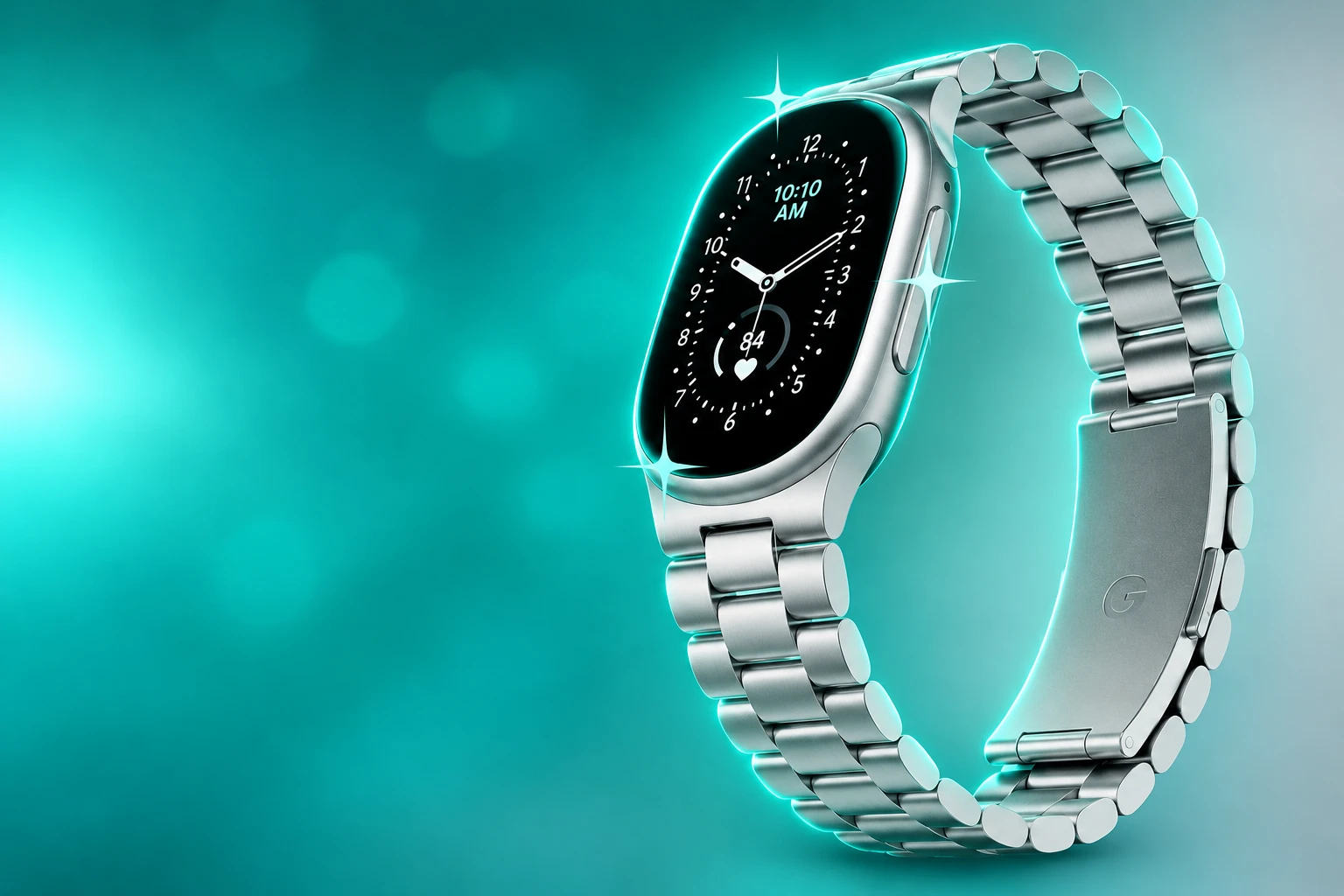
Google unveiled the tracker on October 12 as the smartest fitness tracker ever, a slim aluminum band meant to sit between the screenless Fitbit Air and Pixel Watch 5. The launch pitch covered a larger AMOLED face with 46% more viewing area than earlier Fitbit trackers, up to seven days of battery, built-in GPS, more than 50 workout modes, and on-wrist alerts for maps, media, calls, and messages. Pre-orders opened that day. The posts did not mention reminders to move.
WHAT WE KNOW
- Hourly log: The Edge still records whether you hit 250 steps in a given hour and shows that chart in Google Health.
- No wrist tap: Owners say the band does not vibrate at 10 minutes before the hour when the block is short.
- No switch: The Get Reminders control that older Fitbits expose in device settings is missing for Edge.
- Air already shipped quiet: Fitbit Air went on sale May 26 without the same prompt, and Google staff treated that as a design choice.
WHAT IS UNCONFIRMED
- Intent on Edge: Google has not said whether the missing buzz on Edge is on purpose.
- A later drop: There is no public promise that an app or firmware update will add the alert.
- Help-page lag: Google’s reminder article still reads as if most Fitbit devices can toggle the feature, and it has not been rewritten for Edge.
The device is light enough for all-day wear at 17.7 g without a band and 11.5 mm thin, and it works with Android 11 or newer and iPhone software from iOS 16.4. It can show a call on the wrist. It still will not tell you that the hour is about to close with 80 steps on the board.
Google’s Help Pages Still Teach the 250-Step Buzz
Google did not bury the old feature. A live Google Health help article still walks through how reminders to move are supposed to work on a Fitbit, including the exact tap that used to fire when sitting ran long.
A reminder to move is a notification that cues you to walk at least 250 steps per hour to help you meet your hourly activity goal. If you haven’t walked 250 steps, the reminder appears on your device at 10 minutes before the hour (for example, at 10:50 a.m.) and causes your device to vibrate.
Google Health Help Center
The same article sets the default window at 9:00 a.m. to 6:00 p.m., seven days a week, which is nine hour blocks. It says 250 steps equals a few minutes of walking. Spinning and other sessions with no steps do not count. If you miss a block, extra walking in the next hour does not fill it in. You can change the hours and days, and on most devices you can turn the alerts off.
THE OLD FITBIT HOURLY LOOP
- The goal: Walk at least 250 steps per hour in each tracked block.
- The cue: If you are short, the device shows a reminder at 10 minutes before the hour and vibrates.
- The window: Out of the box that run is 9:00 a.m. to 6:00 p.m., every day, unless you edit it.
- The watch catch: Pixel Watch 4 ships with reminders to move turned off by default, per the same help page.
That last line is easy to skip. Google still supports the alert on Pixel Watch hardware, and the help page tells you how to open Hourly Activity from the crown. It also chose a quiet default on Pixel Watch 4. The dedicated tracker line has gone further. Air never offered the tap. Edge owners now say they cannot turn it on.
Why the No-Screen Excuse Does Not Fit the Edge
Fitbit Air, the $99.99 screenless band that went on sale May 26, was the first Google-era tracker to arrive without reminders to move. In June, a Google Health Community specialist said the feature was missing because Air has no screen to show remaining steps. Another specialist said Air was built for fewer interruptions and for passive health tracking.
Google’s wearables team later told a reviewer the same story in different words: Air is a minimalist band for people who do not want notification stress, the move reminder could be added later, and the motor already works, because Air vibrates when the battery is low. Forum users who wanted the old Fitbit loop called that gap a bad trade on a device that still buzzes for power, not for sitting.
None of those reasons map cleanly onto Edge. The new band has a color AMOLED face, glanceable tiles, custom clock faces, and a physical side button. Google’s own launch post lists Google Maps, media controls, and call and message notifications as everyday tools. If the hardware can tap you for a text, it can tap you because the hour is almost gone.
Google is also loading Edge with newer tricks. Automatic activity tracking, rolling through Google Health 5.11 around the October launch, is meant to recognize up to 100 workout types on Edge, Air, and recent Pixel Watch models, and to log sessions that hold an elevated heart rate past a 15-minute floor. Health Guardian extras such as blood pressure trends and insulin resistance trends sit behind Google Health Premium. Edge is Google’s first repairable fitness tracker, with a replaceable battery. The simple hourly tap is the thing that did not make that list.
Hourly Activity Returned to the App in August
The wrist alert is not the only piece of this feature Google had to put back together in 2026. When the Google Health app replaced the Fitbit app in May, the hourly activity tile vanished from the new dashboard even for people whose older devices still counted the hours. Users who treat those nine blocks as their real goal, not a 10,000-step dump at dusk, noticed first.
Google’s community team told testers the missing piece was a visual component in the preview interface, that historical data was safe, and that the device was still tracking hourly activity. In other words, the band kept scoring the hours. The phone stopped showing the grid. On August 10, users began posting that the Hourly Activity tile was back if they edited the Today layout. The chart returned. The argument about the buzz on new hardware did not end.
HOW THE HOURLY FEATURE SHRANK IN 2026
- 2016: Fitbit introduces reminders to move, tied to a 250-step hourly goal.
- May 26, 2026: Fitbit Air goes on sale without a wrist prompt, even though it can vibrate for a low battery.
- May 2026: The new Google Health app ships without the hourly activity chart; Google says tracking continues.
- June 2026: A Google Health Community specialist confirms Air has no reminders to move and points to the missing screen.
- August 2026: Users find the Hourly Activity tile restored in Google Health.
- October 12, 2026: Google unveils Fitbit Edge with a display, GPS, and phone alerts.
- October 27, 2026: Edge reaches shelves at $179.99, with three months of Google Health Premium included.
- November 19, 2026: Owners report the Edge has no reminders-to-move toggle and does not vibrate for a short hour.
Read that sequence as a product habit, not a one-off bug report. Google will restore a dashboard tile when enough people shout. It has not, as of those November posts, restored the tap on the two newest dedicated Fitbits. Charge 6 owners were still flipping the same switch in the app in 2026. The new bands do not offer them that fight.
Sitting Too Long Is the Problem the Buzz Targeted
Fitbit did not invent the 250-step hour as a cute badge. Google’s help article still argues for it with health research, and it still tells readers why a single evening walk does not replace the hourly break. The Edge will count that evening walk. It will not poke you at 10:50 a.m. when the morning has been a chair.
WHAT GOOGLE SAYS THE HOURLY GOAL IS FOR
- Long sitting: Google’s help page says long periods in a chair are linked with obesity, higher blood pressure, high blood sugar, and abnormal cholesterol.
- Workouts are not enough: The same article says you can meet daily exercise guidelines and still see harm from extended sitting.
- A few minutes: Moving for a few minutes each hour, it says, can reduce those effects.
- No makeup hour: Extra steps in the next block do not repair a missed one, so the prompt has to arrive before the hour ends.
That is why desk-bound buyers talk about this feature as if it were the product. The vibration is the intervention. The chart is the scoreboard. Google even points readers to outside explainers on the health risks of long sitting to back the design. Take the tap away and you still have a well-built logger. You no longer have the thing that interrupts the sitting the help page warns about.
Some people always hated that interruption. Charge 6 and Pixel Watch threads are full of owners hunting for the off switch because the buzz lands in meetings, or because 250 steps in a given hour is a hard ask. Google already answered that group on Pixel Watch 4 by shipping the alert off. Edge owners who wanted it on are the ones with no control at all.
Charge 6 and Pixel Watch Still Offer the Toggle
The feature is not dead across Google’s wearable line. It is missing on the two newest Fitbit trackers, present as a setting on older bands, and present but muted on Pixel Watch 4. That split is the cleanest evidence that Edge is not waiting on a motor Google forgot to solder.
WHERE REMINDERS TO MOVE STAND
| Device | Display and alerts | Reminders to move | What Google has said |
|---|---|---|---|
| Fitbit Air | No screen; vibrates for low battery | No hourly buzz | Fewer interruptions, no screen for remaining steps |
| Fitbit Edge | AMOLED face; calls, messages, maps | Logs hours, no buzz, no toggle | No public comment |
| Pixel Watch 4 | Full watch display | Available, off by default | Stated in Google Health Help |
| Fitbit Charge 6 | Tracker display | Toggle in Google Health | Owners still turn it on and off |
The Store page for Edge does not leave coaching out. It sells personalized coaching built with Gemini through Google Health Premium, a plan that starts at $9.99 a month, and it includes three months of that plan with the tracker. The coach lives in the phone. It can rewrite workouts and talk through sleep. It does not replace a vibration at 10:50 a.m. unless you are looking at the app at the moment the hour is dying.
Google’s help article still says to open Connections, open your device, open Google Health reminders and alerts, then tap Get Reminders. Edge owners say that path is not there for this band. Launch footnotes on the product blog already warn that features can change. Google has not said the hourly tap is one of the features coming later, and it has not said the gap is final.
Until that switch appears, the Edge will keep doing what Air already does with less hardware: score the hour, draw the chart, and let a sitting morning pass in silence. The help page still reads as if your Fitbit is about to buzz. On this one, it does not.
Disclaimer: This article is news reporting on a consumer fitness tracker and on how Google documents an activity reminder. It is for information only and is not medical advice, a diagnosis, or a recommendation to start, stop, or change any exercise or sitting routine. Readers who have health conditions, or who plan to use a wearable to guide daily movement, should talk with a qualified physician or other licensed clinician before acting on any metric or reminder. Prices, app menus, firmware behavior, and Google Health features reflect the company pages and owner reports cited here and can change with later software.

Jennifer Lopez and Mahershala Ali Describe a Pipeline They Cannot Buy

Lightsail Scatter Turns to Drag Far Above Starshot

Tallulah Willis Deletes a Bruce Willis Photo She Called Intimate

S&P 500 Futures Rebound Into a Holiday-Shortened Week

GTA VI’s Record Launch Still Needs the Same Fragile Grid

Aramco Crash Kills 14 Two Days After Oil Restart

Salah Captained Egypt to Their First World Cup Win

Zelda’s 40th Switch 2 Ships Without a Zelda Game

Apple Labor Day Deals Hide June’s Memory Price Hike

El Niño Puts Israel’s Needed Winter Rain on a Flood Clock
-
 BUSINESS5 months ago
Aramco Crash Kills 14 Two Days After Oil Restart
-
 NEWS6 months ago
Salah Captained Egypt to Their First World Cup Win
-
 GAMING3 months ago
Zelda’s 40th Switch 2 Ships Without a Zelda Game
-
 NEWS3 months ago
Apple Labor Day Deals Hide June’s Memory Price Hike
-
 NEWS5 months ago
El Niño Puts Israel’s Needed Winter Rain on a Flood Clock
-
 GAMING3 months ago
Palworld 1.0.4 Adds Palpedia Search After the 1.0 Launch
-

 NEWS4 months ago
Saudi Visa Routes Split Nigerian Travelers Into Two Speeds
-

 BUSINESS9 months ago
BAE’s 60-Year Saudi Franchise Now Runs Through Taif