
NEWS
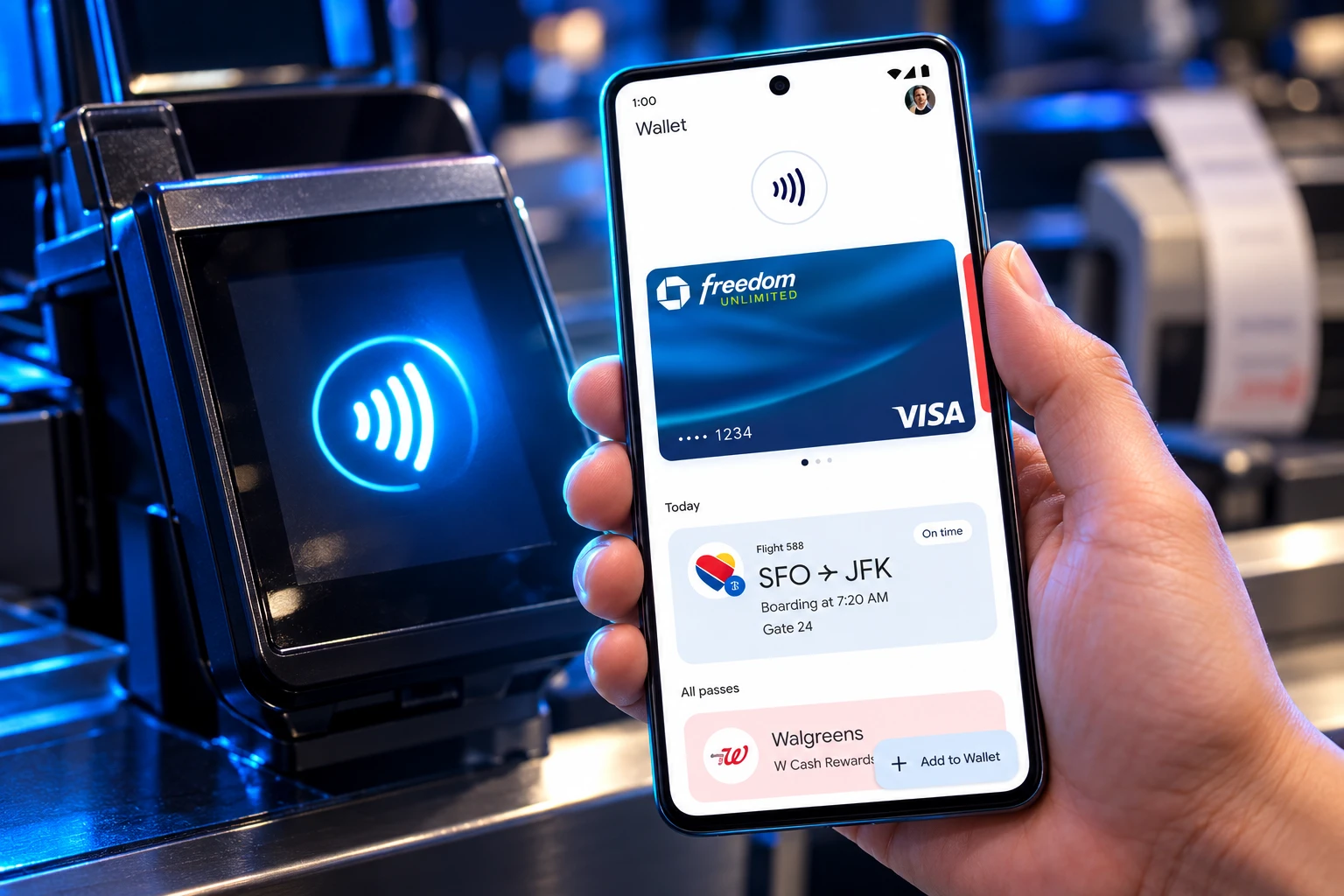
Google Wallet Tests Paying at Stores Without Unlocking
Google Wallet is testing a lock-free store tap that would make a locked Android phone spend like a contactless card, with no launch date yet.

Google Wallet is testing a Tap to pay switch that would let a locked Android phone finish a store checkout. The row showed up in version 26.42.1003171897 under Verification settings. Opening it still crashes the app.
If it ever ships, a locked handset starts to spend the way a contactless card already does. That is a bigger change than a faster coffee line.
Can Google Wallet Pay Without Unlocking the Phone?
Not with the public app. Store taps still need screen lock verification for payments, using a PIN, pattern, password, or Class 3 biometric such as a fingerprint. Google says that check stays good for a few minutes, then you prove it is you again.
The hidden page uses the same heading already used for transit: “Choose if you’ll need to verify it’s you when using your items stored in Wallet.” Tap to pay now sits on that list. Testers who forced the row open got a crash, so there is no working screen, no limit, and no default yet.
Wallet asks for the phone lock, a 4 to 6 digit PIN or the biometric tied to it. It does not ask for your bank card PIN. On Pixel 7 and Pixel 7 Pro, Face Unlock still cannot authorize a tap to pay, which is one reason a register stop feels longer than it should.
Wallet Started Rechecking Identity in 2024
The lock-free store idea is a reversal of a tightening Google already shipped. Two years ago Wallet added Verification settings and kept store taps behind the device lock, while carving out transit as the one place a locked phone could still pay.
WALLET UNLOCK CHECKS SINCE 2019
- 2019: Android 10 adds Secure NFC, exposed in settings as Require device unlock for NFC, so off-host card emulation can be limited to an unlocked screen.
- 2024: Google Wallet adds Verification settings. Transit can skip the lock. Other payments still need a screen lock, and the approval fades after a few minutes.
- March 2026: Pixel Watch Express Pay lets a store or transit tap skip opening Wallet, with the watch still gated by a recent unlock.
- October 27, 2026: A Tap to pay row appears beside transit in Wallet 26.42.1003171897 and crashes when selected.
Google’s own help community has spent those two years telling users the store check cannot be switched off. The new row is the first sign that advice might not stay permanent. Google has not rewritten the help page, and it has not posted a ship date.
Pixel Watch Express Pay Already Skips the App
The closest live preview is on the wrist, not the phone. In March 2026 Google replaced the old “Ride transit” watch toggle with Express Pay and let Pixel Watch users tap stores without opening Wallet first.
PIXEL WATCH EXPRESS PAY RULES
- Hardware: express pay on Pixel Watch 2 and later, with Wear OS kept current.
- Opt-in: The setting is off until you choose Tap to pay and transit, or transit only.
- On-body check: The watch must be on your wrist, and it must have been unlocked in the last 24 hours.
- Default card: Express Pay spends the watch’s default card, not a card you pick in the moment.
- Motion gate: Google says the watch looks for a deliberate reach toward a reader and can ask for a confirm if that motion is unclear.
Ruthwik, a Google Wallet community manager, put the remaining lock in plain language when the feature landed.
Your watch still must be unlocked before you pay.
Ruthwik, Community Manager, Google Wallet Community, March 16, 2026
That is not what the phone toggle implies. A watch on a wrist has an on-body check a phone in a bag does not. Copying the transit exception onto store taps would skip even that.
A Locked Phone Would Spend Like a Card
Physical cards already pay small tickets without a PIN. Mobile wallets were sold as the tighter version of that tap, because the phone lock sat in front of every terminal. Pull that lock off store taps and the phone inherits the card’s theft model: whoever holds it can spend until a network rule, a bank rule, or a remote lock stops them.
The United States has no federal cap on a contactless sale. Visa does not require a cardholder-verification limit on US terminals. If a merchant sets one anyway, Visa’s device guidance says not to put it below $200. That figure is a terminal rule for plastic, not a Google Wallet setting, and the crashed Tap to pay row does not show any cap at all.
HOW UNLOCK RULES COMPARE
| Payment path | Unlock needed | Where it works | Status |
|---|---|---|---|
| Google Wallet store tap | Yes, then a few minutes | Retail terminals | Live |
| Wallet transit exception | Optional off | Supported transit readers | Live |
| Pixel Watch Express Pay | Watch unlocked in last 24 hours | Stores and transit | Live on Pixel Watch 2 and later |
| Phone Tap to pay row | Aimed at no unlock | Retail, if it ships | Hidden, crashes |
| Apple Express Mode | No | Transit, keys, passes; not ordinary retail | Live |
| Physical contactless card | No PIN below network CVM rules | Retail terminals | Live |
Google Wallet already stores Irish and Italian passport passes in the same app. A verification page that talks about “items stored in Wallet,” not just cards, is a wider access switch than a coffee tap. The crash is the only thing keeping that switch theoretical.
Why Apple Pay Still Demands Face ID in Stores
Apple has had the no-unlock tap for years, and it still will not use it at a grocery reader. Express Mode without unlocking iPhone covers transit cards, a payment card used as fare, student IDs, car and scooter keys, hotel keys, and some other passes. Ordinary Apple Pay in a shop still wants Face ID, Touch ID, or a passcode.
A credit card set as the Express Transit card is meant to work at fare readers, not at retail terminals. On supported iPhones, those Express items can keep working for up to five hours in power reserve after the battery is gone. That is a transit and keys privilege, and Apple documents it as such.
Google’s phone experiment points the other way. It puts store checkout on the same exception list as the bus. If the crash becomes a real toggle, Android would offer a lock-free retail tap that iPhone still refuses.
Remote Lock Is the Only Fast Cutoff
A lost contactless card can be tapped until the issuer blocks it. A lost Android phone, today, is a poor substitute because Wallet still wants the lock. Take that lock off store taps and the remaining brake is speed: Find Hub’s Mark as lost lock, a factory erase, or a call to the bank. Those steps need another device and a signed-in Google account. They do not help in the minutes after a phone leaves a pocket.
WHAT WE KNOW
- The row: Tap to pay appears under Verification settings in Google Wallet 26.42.1003171897, on the same page as transit.
- The crash: Selecting it closes the app, so no safeguards are visible.
- The live exception: Transit can already skip the lock; other payments cannot.
WHAT IS UNCONFIRMED
- Spending caps: No dollar limit, velocity cap, or per-day count appears in the unfinished screen.
- Default state: There is no sign whether the switch would ship off, on, or hidden by country.
- Ship date: Google has not announced a rollout, and APK leftovers are often delayed or dropped.
Until that crash becomes a settings page with real limits, a locked Android phone still cannot buy the coffee.

One UI 9.5 Beta Puts the Galaxy S26 on Last Year’s Clock

DBS Puts a 24/7 USDC Window Inside the Bank

European Startups Head for $81 Billion as First Checks Shrink

US Stocks Lost $1.3 Trillion Before Nvidia’s Beat

Home Depot Bets on Finance Chief Richard McPhail as CEO

Aramco Crash Kills 14 Two Days After Oil Restart

Salah Captained Egypt to Their First World Cup Win

Zelda’s 40th Switch 2 Ships Without a Zelda Game

Apple Labor Day Deals Hide June’s Memory Price Hike

El Niño Puts Israel’s Needed Winter Rain on a Flood Clock
-
 BUSINESS5 months ago
Aramco Crash Kills 14 Two Days After Oil Restart
-
 NEWS6 months ago
Salah Captained Egypt to Their First World Cup Win
-
 GAMING2 months ago
Zelda’s 40th Switch 2 Ships Without a Zelda Game
-
 NEWS3 months ago
Apple Labor Day Deals Hide June’s Memory Price Hike
-
 NEWS4 months ago
El Niño Puts Israel’s Needed Winter Rain on a Flood Clock
-

 GAMING2 months ago
Palworld 1.0.4 Adds Palpedia Search After the 1.0 Launch
-
 NEWS4 months ago
Saudi Visa Routes Split Nigerian Travelers Into Two Speeds
-

 BUSINESS9 months ago
BAE’s 60-Year Saudi Franchise Now Runs Through Taif